We write it.
You approve.

Most email tools hand you a blank canvas and say “figure it out.” HeyApprove watches your register and your calendar, prepares the whole campaign, and asks you one question. That’s the whole job.

Four steps. You’re only in one of them.

01 · I notice

Your register and your calendar

HeyApprove reads what you actually sell from Square, Shopify, or Mindbody, and watches for slow afternoons, customers who haven’t come back, weather that changes foot traffic, and the holidays that matter to your kind of business. It doesn’t reach out just to reach out — a couple of proposals a month, fewer if you keep skipping them.

The calendar A slow week An open slot Weather A regular gone quiet
02 · I prepare

The whole campaign, finished

The offer, the subject line, the copy, the promo code created in your point-of-sale, who it goes to, whether it’s email or text, and when it should land. Not a template with blanks — a finished draft written from your own products and your own sales, in honest language.

CAMPAIGN READY OFFER AUDIENCE CHANNEL TIMING COST
03 · You decide

Approve, change something, or not this time

It lands in your inbox with everything you need to judge it: why HeyApprove is suggesting it, who it reaches, when it goes, and what it costs. “Not this time” is a full answer — skipping is free and it costs you nothing. If you don’t answer at all, it expires and nothing goes out.

STILL WAITING FOR YOU OFFER AUDIENCE CHANNEL COST TIMING
04 · I handle it

Sending, tracking, reporting back

Delivery, the promo code’s whole life in your POS — created, redeemed, removed when it expires — unsubscribes and STOP replies, and then the part that matters: how many people came in and what they spent, in register dollars, not opens and clicks.

Campaign complete Learned preference NEXT What came back What I learned What I suggest next

What that looks like

1
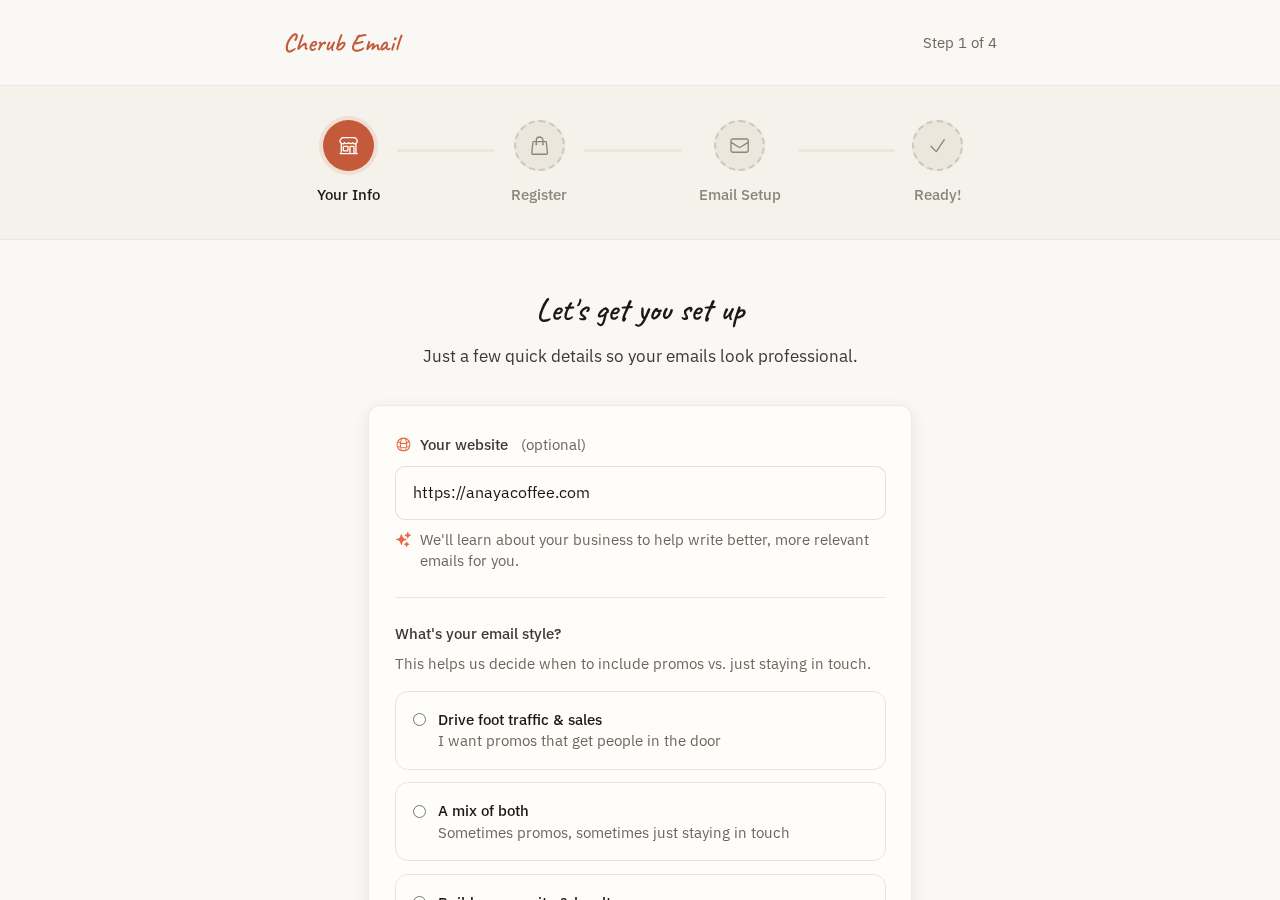
HeyApprove onboarding screen

Connect your business

Answer a few questions and connect Square, Shopify, or Mindbody. Takes about five minutes.

2
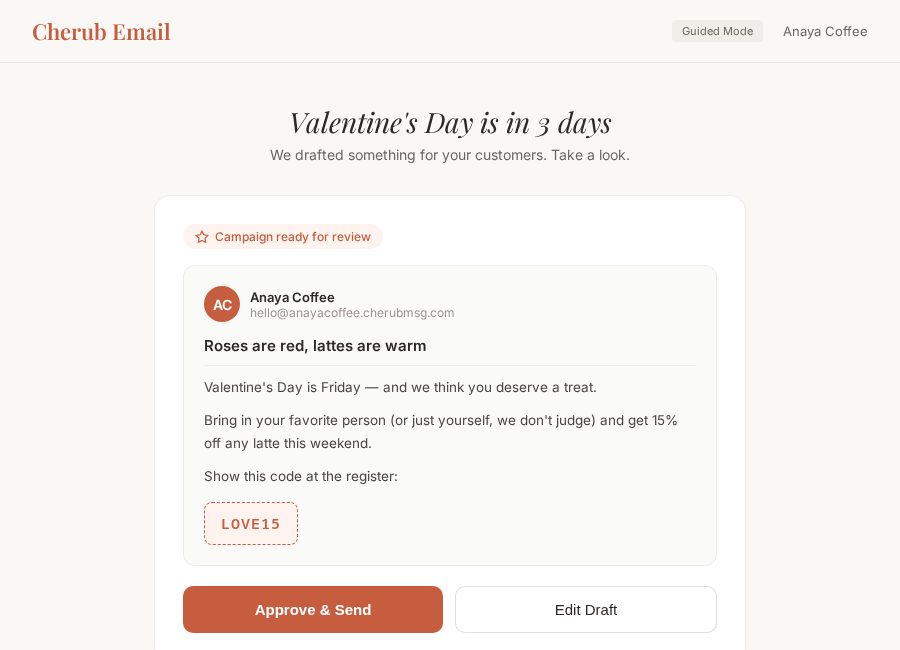
Campaign proposal ready for review

I prepare the campaign

Finished and ready — not a suggestion for you to build from.

3
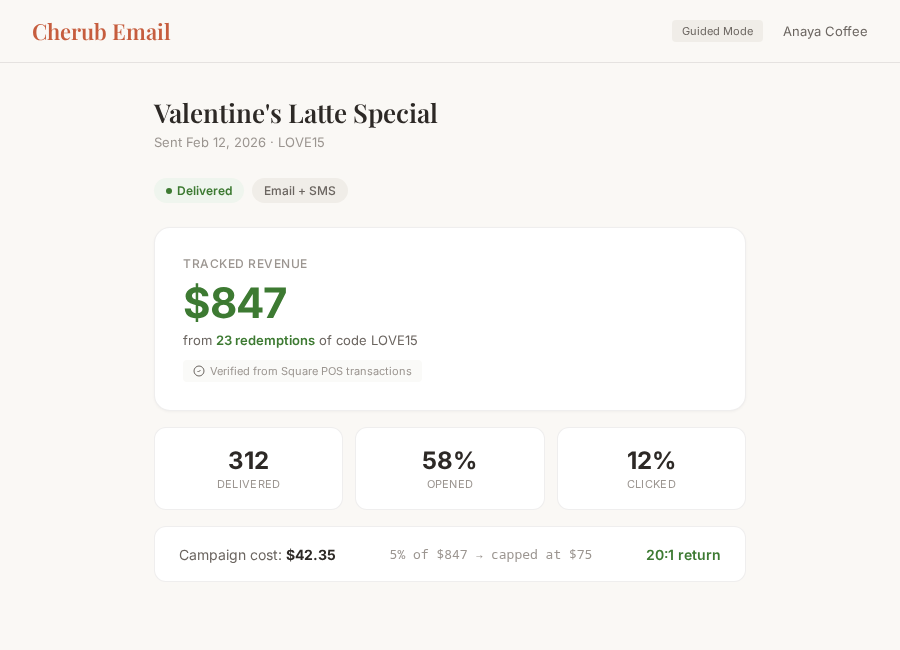
Campaign results showing tracked revenue from POS

You approve, I report back

One tap sends it. Tracked revenue from your register shows up after.

Want to see what I’d send for your shop?

Pick your business and what’s coming up, and I’ll show you the campaign.

See what I’d send

Building your list

Your list is people who asked — no purchased lists, no scraping.

Scan Consent recorded On your list

QR code sign-up

Print a QR code for your counter, table tent, or receipt. Customers scan with their phone, tap to send a quick email, and they’re on your list. No app needed.

Import existing lists

Already have a customer list? Import it. HeyApprove verifies emails for deliverability and cleans out invalid addresses so you’re not paying to send to dead ones.

Double opt-in on email

New email subscribers confirm by clicking a link before they’re added. Texts work differently — a customer starts things by texting you first, so there’s no confirmation step to add.

Pick how hands-on you want to be

Guided mode

Answer a few questions, I do the rest

Step-by-step flows that walk you through everything. Review the draft, approve it, done. No dashboard to figure out.

  • Simplified campaign review
  • Step-by-step subscriber setup
  • Fewer decisions, same results
Pro mode

More visibility, same simplicity

Full dashboard with metrics, campaign history, and the editor always available. Still just approve, change, or skip — with more of the picture in view.

  • Campaign performance metrics
  • Subscriber management
  • Revenue tracking dashboard

Switch between modes anytime. No features locked behind either one.

Common questions

Do I have to approve everything HeyApprove sends me?
Yes — nothing sends without your approval. Every proposal is Approve, Change something, or Not this time. Skipping is a real answer and it doesn’t cost you anything.
How does HeyApprove know my business voice?
It learns about your business from your website and your connected POS product catalog. Over time, the more you approve, change, or skip, the better the proposals fit how you actually talk.
Can I write my own campaign instead?
Yes. Start from what HeyApprove prepared, or start from a blank page. The editor is always there if you’d rather write it yourself.
How long does setup take?
About five minutes. Create an account, tell HeyApprove your website, connect Square, Shopify, or Mindbody. That’s it — your first proposal follows shortly after.

Ready to stop thinking about email?

Connect your POS and I'll start watching your calendar. I handle the when, what, and how.

Put HeyApprove to work